How to Choose Stone Slab Layout Software for Bridge Saws
Investing in a 3-axis or 5-axis CNC bridge saw or robotic sawjet represents one of the largest capital expenditures a countertop fabrication shop will ever make—frequently exceeding $150,000 to $400,000. Yet many fabricators run these state-of-the-art cutting machines using clunky, 15-year-old CAD software locked behind physical USB dongles, or worse, leave layout decisions entirely to saw operators eyeballing tape measures on the table.
When raw quartz, granite, and porcelain slab costs consume 35% to 45% of your total project revenue, the bridge saw software you choose directly dictates your shop's net profitability. Here is the definitive engineering guide to evaluating and selecting stone slab layout software.
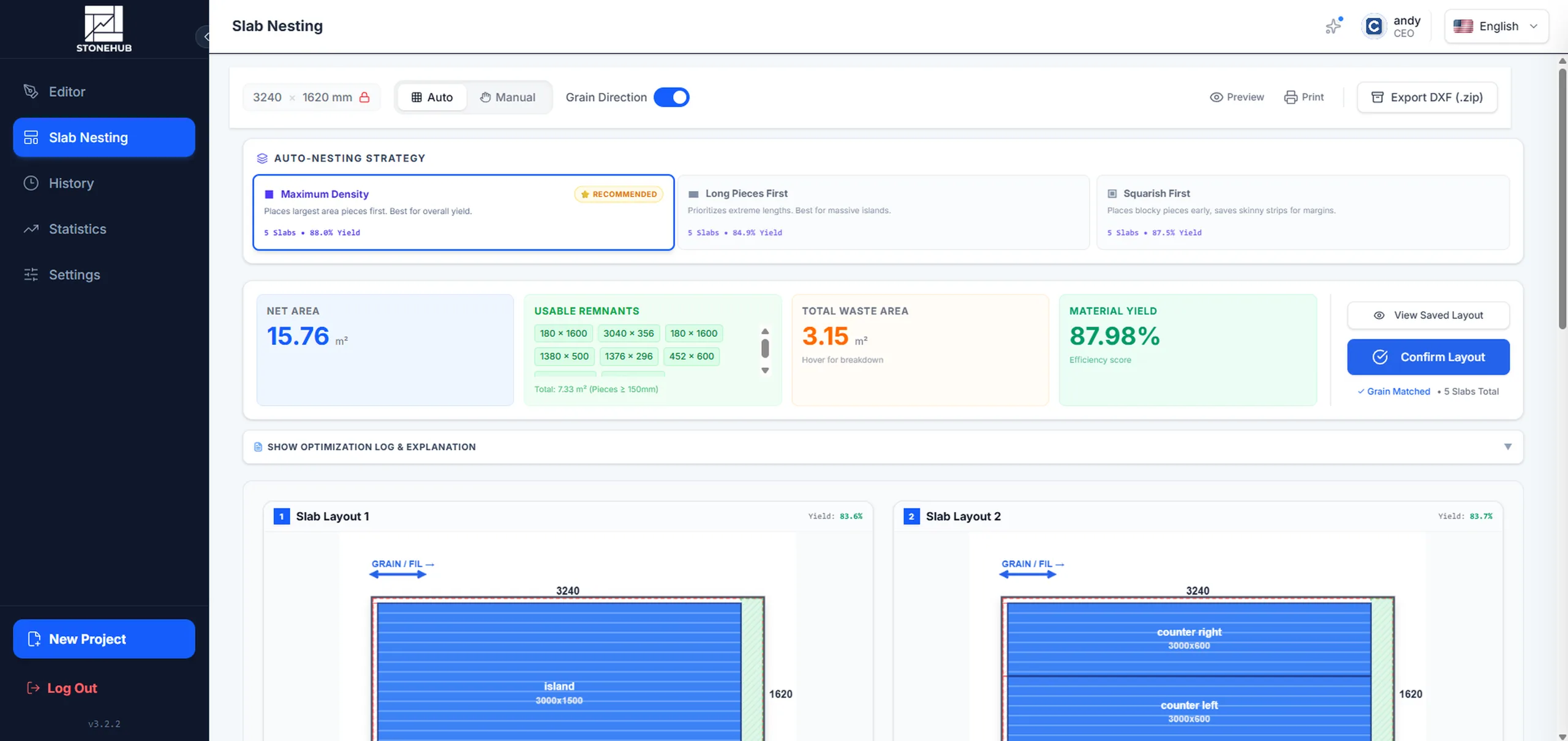
Figure 1: Digital slab layout software automatically packs countertop parts onto raw inventory, accounting for perimeter blade clearance, kerf spacing, and continuous vein orientation.
What Is Stone Slab Layout Software for Bridge Saws?
Stone slab layout software is specialized CAD/CAM nesting software designed specifically for natural stone, engineered quartz, and sintered porcelain fabricators. Unlike generic drafting tools (such as generic AutoCAD or SketchUp), stone layout software understands the physical laws of bridge saw operation.
It bridges the gap between customer architectural drawings and the physical saw table by performing three core operations:
- Part Digitization & Edge Detailing: Imports or drafts exact millimeter countertop shapes, cutouts (undermount sinks, cooktops), and profiles edge treatments (mitered aprons, full bullnose, ogee).
- Algorithmic Slab Packing: Arranges dozens of custom parts across raw digital slabs to maximize material recovery, minimizing the number of slabs purchased per job.
- Machine Toolpath Generation (DXF): Converts digital nesting layouts into clean, layered DXF cut files formatted specifically for your bridge saw's CNC control software.
6 Critical Features Every Bridge Saw Layout Software Must Have
1Universal DXF Toolpath Compatibility Across Saw Brands
Many machine manufacturers bundle proprietary layout utilities that only output code for their specific brand. If your shop operates a mixed equipment fleet—such as a Park Industries CNC saw alongside a BACA Systems Robo SawJet, or European bridge saws from Breton, Prussiani, GMM, CMS, or Northwood—machine-locked software fractures your shop workflow.
Look for software that exports universally compliant, clean 2D DXF files with standard layer conventions (such as closed perimeter polylines on Layer 0, cutout lines, core drill points, and seam indicators). Your programmers should create the cut package once and send it to whichever saw table has open capacity.
2Blade Kerf Offset & Over-Cut Collision Avoidance
A circular diamond bridge saw blade is not a laser. Standard 350mm to 400mm diameter blades have a segment thickness of 3.2mm to 4.5mm (the blade "kerf"). More importantly, the curved radius of a circular blade means the bottom of the blade cuts further forward than the top—creating an inevitable "radial over-cut" at the end of every plunge.
If layout software does not understand circular blade geometry, it will nest parts too closely together. When the saw blade cuts along piece A, its over-cut penetrates into piece B, ruining a $2,000 quartzite island.
Your layout software must automatically calculate blade kerf offset, provide customizable blade thickness settings, and enforce minimum safe clearances between nested pieces.
3Digital Vein Continuity & Grain Flow Matching Across Seams
Today's homeowners and commercial designers demand prominent, flowing veins—such as dramatic Calacatta Gold quartz, Statuario, or exotic Brazilian granite. When an L-shaped countertop or waterfall island has broken, misaligned veins across the 45-degree or 90-degree miter seam, customers reject the entire installation.
Modern slab layout software allows estimators to lock grain directions (0° or 180° rotation limits) during automatic nesting, or visually preview continuous vein flow across adjoining pieces on a digital slab photograph.
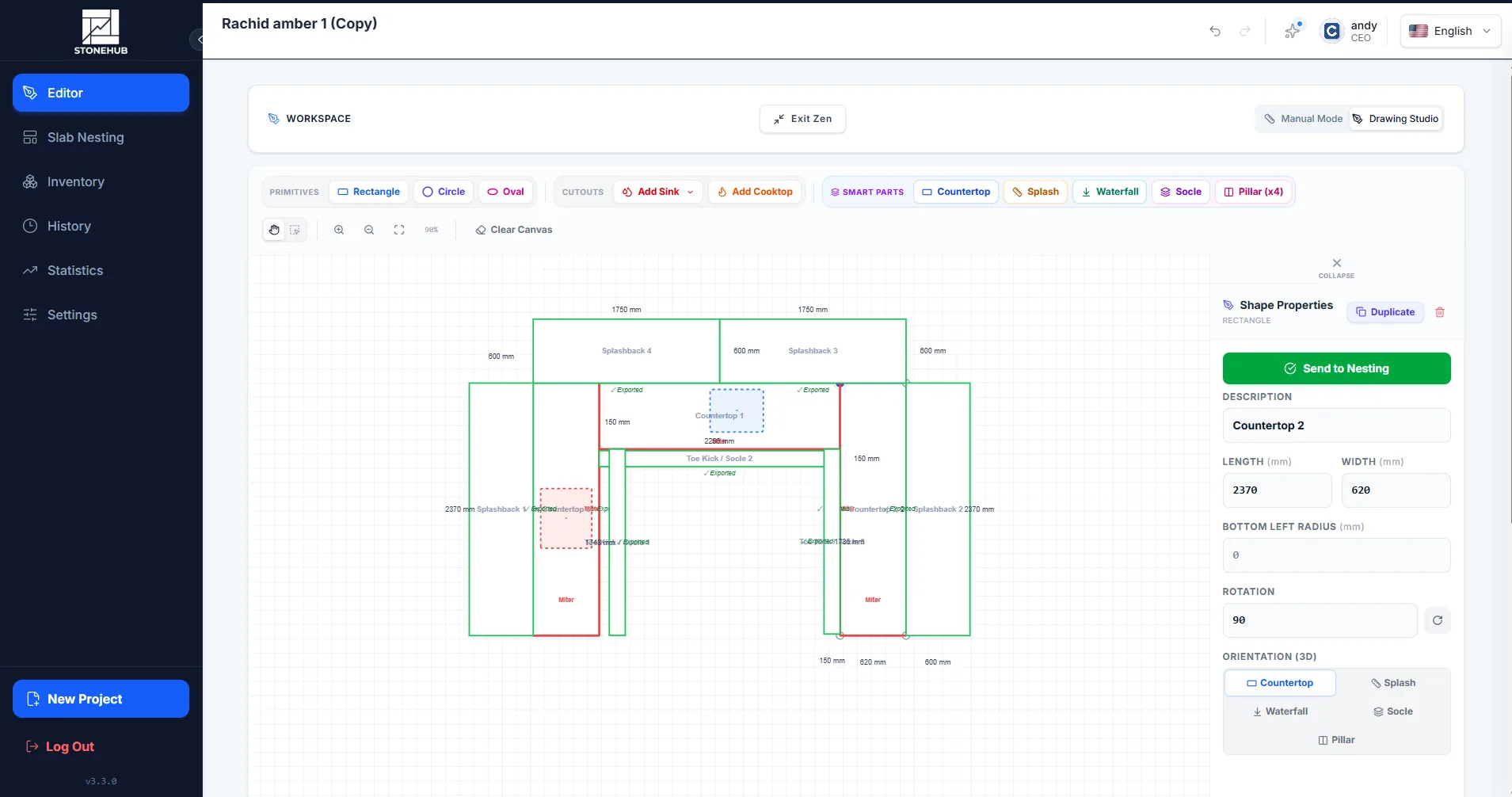
Figure 2: In StoneHub's 2D CAD studio, seam placements, cutout offsets, and splashbacks are precisely configured before sending the geometry to the automated nesting engine.
4Automated Algorithmic Nesting vs. Manual Saw Operator Jigsawing
In many shops, a saw operator spends 20 to 35 minutes per job manually shifting parts around on a touch screen. Beyond wasting expensive saw cutting time, human spatial planning cannot compete with mathematical optimization.
Benchmarked data demonstrates that manual saw nesting averages 76% to 82% material yield. In contrast, computational auto-nesting software consistently achieves 88% to 95% yield by calculating multi-slab arrangements and tucking small backsplashes and bathroom returns into open window drops.
→ Curious how much money this yield gap represents? Use our interactive Countertop Material Recovery Calculator to see your annual recovery forecast.
5Digital Remnant Offcut Cataloging
When an auto-nesting run finishes, what happens to the remaining slab offcut? In traditional fabrication yards, remnants sit outside on A-frames gathering dust until someone breaks them with a forklift.
Leading stone layout software automatically calculates the bounding dimensions of any remaining offcut material exceeding your shop's threshold (e.g., pieces ≥ 150mm × 600mm) and logs them into a digital remnant catalog with square footage, material codes, and rack locations. Estimators can then pull these remnants into upcoming small vanity jobs, turning dumpster scrap into pure profit.
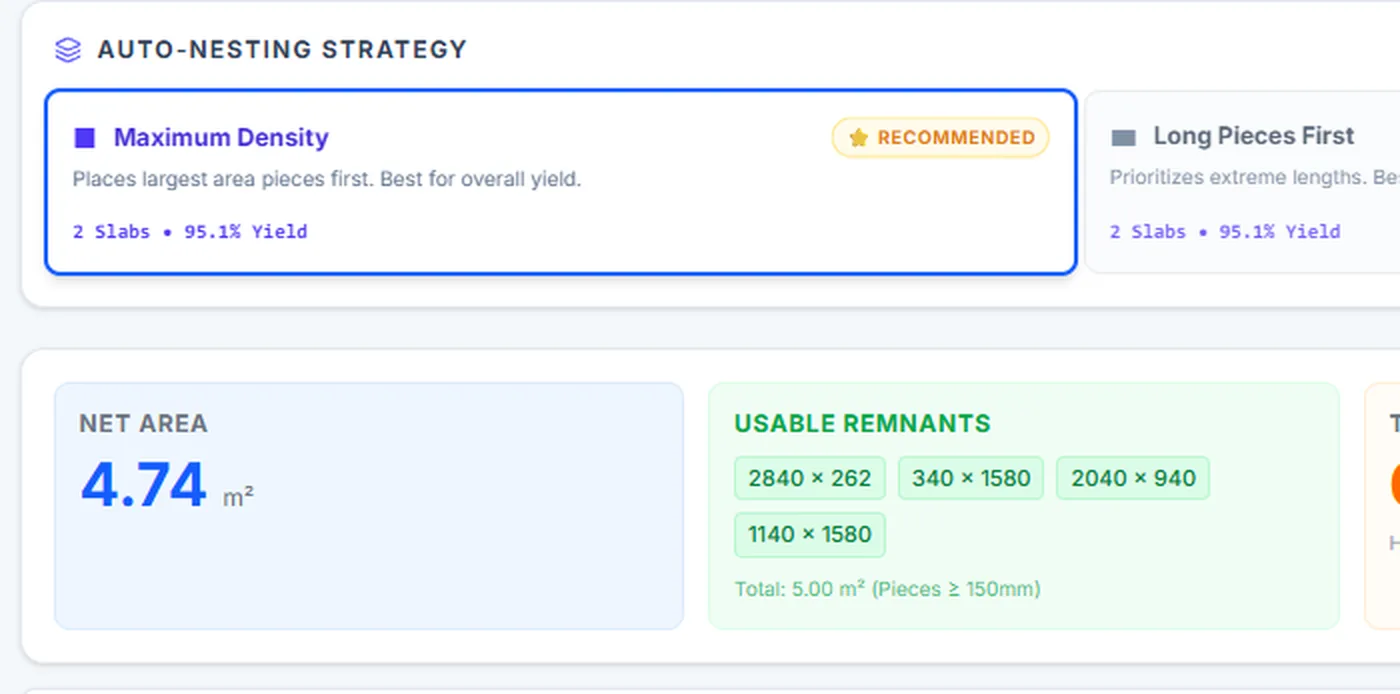
Figure 3: StoneHub logs usable remnant offcuts directly from the bridge saw nesting stage, ensuring shop estimators monetize drops for smaller vanity countertops.
6Cloud-Native Collaboration vs. Machine-Locked Hardware Dongles
The era of buying $5,000 desktop licenses that require a physical USB dongle plugged into one computer in the back office is over. When your software is tied to a single machine, estimators cannot check layout feasibility while meeting with customers, and saw operators cannot check drawings from the shop floor.
Cloud-native stone software allows estimators, project managers, and sawyers to collaborate on the same job in real time from any tablet, laptop, or workstation with zero server installations.
Comparison: Legacy Saw Software vs. Modern Integrated StoneHub
| Evaluation Feature | Legacy Saw Utilities | StoneHub Cloud Platform |
|---|---|---|
| Machine Compatibility | Locked to single saw manufacturer | Universal DXF (Park, BACA, Breton, GMM, etc.) |
| Nesting Method | Manual drag & drop (76%–82% yield) | Algorithmic auto-nesting (88%–95% yield) |
| Blade Kerf & Collision Protection | Basic manual offsets; prone to over-cuts | Automated plunge safety & kerf spacing |
| Remnant Tracking | None or disconnected spreadsheet | Automated cataloging with dimensions & yield |
| Quoting & Profit Warning | Saw only; no quoting connection | Flags extra-slab risks before quotes are sent |
| Licensing & Hardware | $3,000–$8,000 + physical USB dongle | Predictable monthly/annual subscription, zero dongles |
The Real Bottom Line: What an 8%–14% Yield Gain Means in Dollars
Consider an average countertop fabrication shop cutting 150 slabs per month at an average material cost of $1,200 per slab. That shop spends $180,000 per month on raw stone—over $2.1 million per year.
By lifting your average slab utilization by just 8%—saving 12 slabs each month that would have otherwise ended up as scrap in the dumpster—your shop puts over $170,000 directly back into owner profit without having to sell a single additional kitchen.
To learn more about stopping profit loss on custom countertop quotes, read our companion analysis: How to Maximize Stone Slab Yield: Stop Losing Margin on Custom Countertops.
Frequently Asked Questions About Bridge Saw Layout Software
Vein Matching Software for Mitered Waterfall Islands: The Fabricator's Guide →
Master vein matching and grain continuity on mitered waterfall islands. Calculate 45° kerf deductions, perform digital B-side slab flipping, and eliminate costly slab remakes with digital twin nesting.
Upgrade Your Saw Output with StoneHub
Test automated stone slab nesting, 2D CAD shape drafting, and universal CNC bridge saw DXF exports risk-free for 14 days.
Setup in 60 seconds. No credit card required. Universal DXF output for all CNC saws.